


Quick answer
Choose the credential by who uses the door and what the site does to it. Cards suit offices, fingerprint suits staff with clean hands, face recognition suits wide, busy doors without gloves or masks, and PIN alone suits low-risk doors. The lock type, the exit route and power-cut behaviour decide safety more than the reader.
Key takeaways
- Pick the credential by the user and the site: gloves, dust, lighting, visitors and staff turnover all change what works.
- A reader is only half the system. The lock type, the exit route and what happens in a power cut decide safety.
- Cards and PINs can be lent. Fingerprint and face cannot, but each fails in specific conditions you should test on site.
- Standalone terminals suit one or two doors. Networked controllers suit many doors, logs and fast removal of leavers.
- Ask where biometric data is stored and how it is deleted, and confirm any Dubai registration or building rules before work starts.
Short answer: pick the credential by who uses the door and what the site does to the reader. Cards suit most offices. Fingerprint suits staff with clean, dry hands and no gloves. Face recognition suits wide, busy doors where hands are full. PIN alone is for low-risk doors. But the reader is only part of the system. The lock, the exit route and the power-cut behaviour decide whether the door is safe, so specify those first and the reader second.
Most access control quotes we are asked to compare look like a shopping list of readers with a price next to each. The jobs that go wrong rarely fail because of the reader. They fail because the lock did not suit the door, a fire exit stayed locked in a test, or the system lost power and nobody could get in or out. This guide is for office managers, lab and facility managers and warehouse operators in Ajman, Sharjah, Dubai and Abu Dhabi who need to choose, and then write a spec that produces quotes they can compare.
Door or gate giving you trouble?
Call +971 50 495 3512 WhatsApp us Get a quote
Open 24/7 · Same-day technician · Free site visit
Which credential should I use: card, PIN, fingerprint or face?
| Credential | Works well for | Where it fails | Honest note |
|---|---|---|---|
| Card or tag (RFID) | Offices, shared doors, visitors, contractors, high staff turnover | Lent, lost or cloned cards. A person can walk a card to a friend | Cheapest to issue and cancel. Pair with PIN for sensitive rooms |
| PIN code | Low-risk doors, store rooms, back-of-house, a second factor with a card | Shared, written on a sticky note, seen over a shoulder | Never enough alone for a lab or a server room |
| Fingerprint | Staff doors where users have clean, dry hands, and where lending must stop | Dirty, oily, wet, scarred or worn fingers. Gloves. Dust on the sensor | Test with your real staff before ordering the whole site |
| Face recognition | Wide doors, busy entrances, hands-full users, contact-free policy | Strong back-light, masks or helmets, poor camera angle, some dust on the lens | Check the lighting at the door at noon and at night |
| Combination (card plus PIN, or card plus fingerprint) | Labs, server rooms, stock cages, finance offices | Slower for users, more to maintain | Use on the few doors that need it, not the whole building |
Our service pages list what we fit: RFID card access control, biometric access control and face recognition access control. We work with brands such as ZKTeco, Suprema and Hikvision.
What suits an office?
An office has mixed users: permanent staff, visitors, cleaners, contractors. Cards or tags are the practical default, because a lost card can be cancelled in seconds and a visitor card can expire at the end of the day. Add a PIN or fingerprint on the doors that matter, such as finance, HR, the server room and the managing director's floor. If you also use the same system for attendance, check that the software exports to your payroll tool, and that you are comfortable with staff clocking in by biometric. Glass entrance doors need a lock suited to glass, so plan it with the door supplier. See our guide to automatic sliding glass doors for shops, clinics and offices for how a reader and a glass door work together.
What suits a lab?
Labs care about two things: who went in, and keeping unauthorised people out of a small area. Use two-factor (card plus PIN, or card plus fingerprint) on the restricted rooms, keep the log, and decide who reviews it and how often. Gloves and lab coats rule out fingerprint on the door itself in many labs, so a card and PIN reader, or a face reader at a clean entry point, may fit better. Ask how the lab door behaves in a fire or a gas alarm. Some doors need to release automatically and some must stay locked, and that is a decision for your safety officer and the building's fire consultant, not for a reader supplier. For high-security rooms we also supply data centre access control and mantrap security doors.
What suits a warehouse?
A warehouse stresses readers in ways an office never does: dust from cartons and concrete, heat, forklifts and trolleys at the door, gloves, hi-vis and helmets, and a changing workforce of drivers and agency staff. In practice:
- Cards or tags on a lanyard are cheap, hard-wearing and work with gloves on. They can be lent, so pair them with a camera or a log review at the sensitive doors.
- Fingerprint struggles with gloved, dusty or oily hands. It works better at a clean office entrance than at a loading door.
- Face recognition works for staff doors with steady lighting, but check glare at a bay door and ask how it copes with helmets, masks or high-vis hoods.
- Long-range readers exist for vehicles and trucks. Ask us if the problem is gate and yard control, and see gate access control.
The reader should be rated for the dust and the heat where it sits. Ask for the ingress protection (IP) rating on the datasheet, and avoid mounting a reader in direct sun on a west-facing wall. Joining the pieces matters too: dock levellers, high speed doors and the gate or turnstile should share one logic if they are to work together. Our high speed doors buyer's guide covers that side, and our turnstile gates are an option where one person at a time must pass.
Why do the lock and the exit route matter more than the reader?
A reader only sends a signal. The lock holds the door. Three types cover most jobs:
- Electric strike. Fits a normal door with a latch. Usually fail-secure, which means it stays locked when power is lost, while the inside handle still lets people out.
- Magnetic lock. Holds the door shut with a magnet and releases when power is cut. This is fail-safe, so a power cut frees the door. It is common on glass and escape doors, and needs a proper release button and the right fire alarm connection.
- Motorised bolt or drop-bolt. For heavy, high-security or outdoor doors.
The fail-safe and fail-secure choice is a safety decision. Doors on an escape route generally need to open freely from the inside and to release in a fire. What exactly applies to your building is set by the fire consultant and the relevant authority, and varies from site to site. We tell customers to ask for it in writing before any lock is ordered. A supplier who skips this question is a supplier to avoid.
What happens in a power cut?
UAE sites see outages, and a surge can damage a controller. Decide this before you buy:
- A battery or UPS on the controller and locks, sized to run the doors for a set time.
- Which doors fail open for safety and which fail locked for security.
- A mechanical key or emergency override on the doors that must stay secure.
- What happens to the logs and the user list if the network drops, since some terminals keep working on their own and some do not.
Standalone terminal or networked system?
| Option | Best for | Trade-off |
|---|---|---|
| Standalone terminal | One or two doors, a small office, a stock room | Users are enrolled at the device. Removing a leaver means visiting every terminal |
| Networked controller with software | Many doors, several floors or buildings, logs, visitor and shift rules | More to install and a network to keep up. Much easier to audit and cancel users |
| Cloud or app managed | Several small sites managed centrally | Depends on internet, and you need to understand where the data lives |
Some people buy a standalone terminal for the first door and discover at door three that they need a network. If you expect growth, plan the cabling and controller for it now.
What about biometric data and rules?
A fingerprint or a face template is personal data. Ask any supplier where the templates are stored (on the device, on a server, or in the cloud), who can export them, and how a leaver's data is deleted. Ask your own legal adviser what applies to your business. If the site is in Dubai, ask your building management whether registration with SIRA, the Dubai security industry regulator, or the use of an approved installer is required before work starts. One source we read describes SIRA as covering the installation of access control systems in Dubai. For sites in Ajman, Sharjah and Abu Dhabi, confirm what your building management or the relevant authority needs, since we do not assume Dubai rules apply elsewhere.
What drives the price?
- Number of doors, and the type of each door (wood, steel, glass, roller shutter, gate).
- The lock hardware per door, plus the exit button and the emergency release.
- Reader type, with biometric and face usually costing more than cards.
- Controller type, standalone or networked, and software and user licences.
- Cabling, containment and door preparation. Running cable through finished ceilings costs more than the readers in some buildings.
- Power backup.
- Integration with gates, turnstiles, barriers, intercom, CCTV or attendance software.
- Support and an annual service plan.
This is why we survey the doors first and quote after. We can look at intercom, CCTV and the doors together in one visit, starting from our access control systems range.
How do I write a spec that gets comparable quotes?
- List every door with its type (wood, steel, glass), width and who uses it.
- State the credential on each door, and the second factor on sensitive ones.
- State the lock behaviour in a power cut and in a fire, as confirmed by your fire consultant.
- State how many users, and who manages enrolment and leavers.
- State the battery run time you need.
- Ask each supplier for the reader model, its IP rating, the controller, the lock and the warranty in writing.
- Ask for the annual service terms. Our AMC checklist shows what a good service plan covers.
When not to DIY
A stand-alone terminal on a normal door is something a handy facilities team may fit. Do not wire a lock into a fire alarm panel, tamper with an escape door's release, fit a magnetic lock on an exit without a release button and a fire alarm link, or run mains cable near low-voltage cable yourself. A door that will not open in a fire is the worst kind of access control failure. Get it designed and tested by an installer who will sign off the work.
Frequently asked questions
Is fingerprint or card access control better for an office?
Cards are better for mixed users and quick cancellation. Fingerprint is better where lending must stop and hands are clean. Many offices use cards on most doors and add fingerprint or PIN on a few.
Does face recognition work in a dusty or bright warehouse?
It can, but glare, dust on the lens, helmets and masks all affect it. Test at the actual door, in the brightest and darkest hours, before ordering the whole site.
What happens to the doors in a power cut?
It depends on the lock. Fail-secure locks stay locked and fail-safe locks release. Escape doors normally need to release, and your fire consultant sets what applies. A battery or UPS keeps the system running for a set time.
How many users and doors can one system handle?
Standalone terminals handle a limited number of users and have to be enrolled one by one. Networked controllers handle far more doors and users and give central logs. We size it from your door list.
Do I need SIRA approval for access control?
If the site is in Dubai, ask your building management and confirm with the authority before work begins, since sources describe SIRA as regulating access control installation there. Do not assume the same applies in Ajman, Sharjah or Abu Dhabi.
Can access control be linked to gates, turnstiles and attendance?
Yes. Many systems drive turnstiles, barriers and gates, and some export to attendance and payroll software. Tell us what you need to connect and we design it in from the start.
Get it checked on site, free for quotes
Planning access control for an office, lab or warehouse? Send a photo and the rough size on WhatsApp, or call +971 50 495 3512. A technician visits, measures, tests what is already there and gives you a written quote you can compare. We cover Ajman and Sharjah, and book Dubai and Abu Dhabi jobs by appointment. Request a free site visit here.
Need this done on your property?
Tell us the opening, the fault or the equipment. We reply with a free site visit and a written quote.
Call +971 50 495 3512 WhatsApp us Get a quote
Open 24/7 · Same-day technician · Free site visit
Related products
-
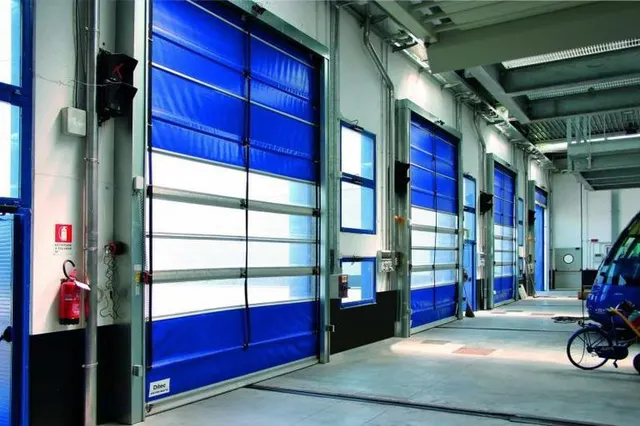
UltraSpeed High-Speed Door
A fast roll-up door for busy openings, cutting the time an entrance stays open, with safety sensors and a flexible curtain that is forgiving if hit.
View details -
 Featured
Automatic Sliding Glass Doors
Automatic sliding glass doors for shops, clinics, hotels and offices: touch-free, accessible entry with safety beams, adjustable hold-open time and a quiet, reliable operator.
View details -
Turnstile Gates
Tripod, full-height and speed-gate turnstiles that admit one person per credential, count entries and link to card, face or fingerprint access control.
View details -

Dock Levelers
Hydraulic and mechanical dock levelers that bridge the gap between truck and warehouse floor, sized to your loads and supplied, installed and serviced across the UAE.
View details